
Getting Started
What is article gifting? Article gifting allows you to share premium Rampart content with friends, family, or colleagues who don't have a subscription. It's a great way to share important stories and introduce others to Rampart's journalism.
Who can gift articles? All paid Rampart subscribers can gift articles. Individual subscribers can gift 4 articles per month, while Chairman's Lounge members can gift 10 articles per month. Want to upgrade? You can do that here.
For Subscribers (Gifting Articles)
How do I gift an article?
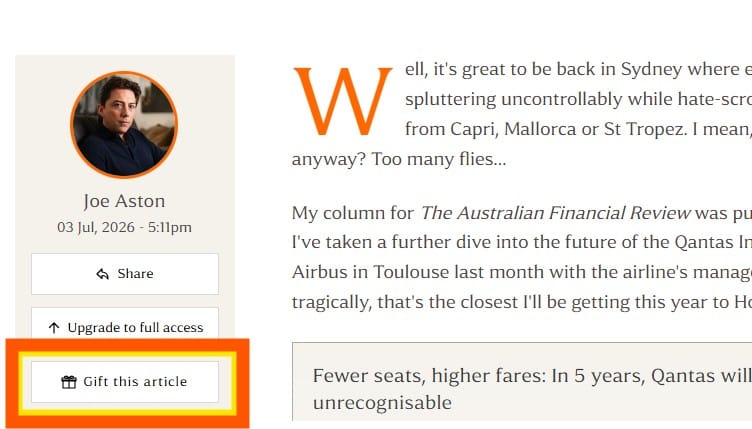
- Open any article you'd like to share
- Click the "Gift This Article" button
- Choose your sharing method: email, WhatsApp, SMS, or copy a direct link
- Send or share the link with your recipient
Your recipient will need to create a free Rampart account (or log in if they already have one) to access the article.
How many articles can I gift each month?
- Individual subscribers: 4 articles per month
- Chairman's Lounge members: 10 articles per month
Your gift allowance resets at the start of each calendar month. Unused gifts do not carry over to the following month.
Can I gift the same article to multiple people? Yes, but each person requires one of your gift credits. For example, gifting the same article to 3 different friends would use 3 of your monthly gifts.
Where can I see how many articles I have left to gift? Check your gift management dashboard in your account settings to see your monthly gift count and remaining allowance. You can also view your complete gifting history, including which articles you've shared and their status.
Can I see if someone has read the article I gifted them? Yes! Your dashboard shows the status of each gift, including whether it's been claimed and accessed by the recipient.
What happens if I've used all my monthly gifts? You'll need to wait until the next calendar month when your gift allowance resets. If you frequently share articles, consider upgrading to the Chairman's Lounge membership for a higher monthly allowance of 10 gifts.
Can I add a personal message when gifting an article? Yes, when sharing the direct link via email you can include a personal message along with the gifted article. For WhatsApp, SMS, or direct links, you can add your own message after you send the link.
Does the recipient know who sent them the article? They will know the invitation to access the article came from you via the email/SMS/WhatsApp message.
For Recipients (Receiving Gifted Articles)
I received a gifted article link. How do I access it?
- Click the link you received
- You'll be prompted to enter your email to claim the article. If you're new to Rampart, you'll be opted in to the free Rampart newsletter. If you're an existing subscriber you'll be prompted to log in
- Once registered and signed in (check your inbox for the verification link), the gifted article will appear as a notification in the bottom right hand side of your screen.
You have 7 days to read the article after claiming it. During this time, you'll be able to find your gifted articles in the box on the bottom right of screen:
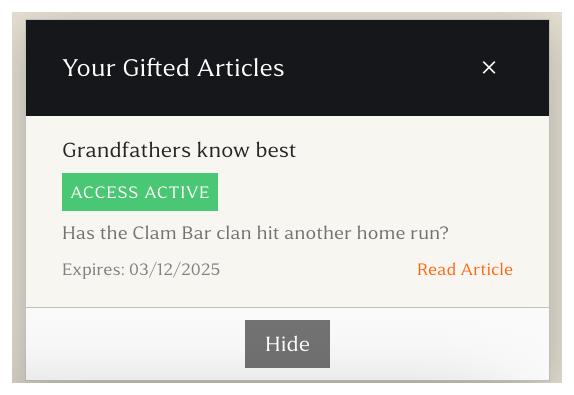
The link says the article has already been claimed. What does this mean? Each gifted article can only be accessed by one person – the first person to register or log in and claim it. If you're seeing this message, either someone else has already redeemed this particular gift or you are clicking on the message after you’ve already claimed it. If it’s the latter, log in to Rampart and you should see the article in your gifted articles section at the bottom right (see images above).
Do I need to pay to read a gifted article? No, gifted articles are completely free to read once you create a free Rampart account. You'll have 7 days to read the article after claiming it.
I already have a free Rampart account. Do I need to register again? No, but you do need to enter your email to claim the article on the link sent to you. Then simply log in with your existing account details to read the gifted article.
How long do I have to access a gifted article? Once you claim the gift, you have 7 days to read the article before access expires.
Can I share the gifted article link with others? No, each gift can only be claimed and read by one person. The link is unique to you. If you'd like to share Rampart articles with your friends, consider subscribing to get your own monthly gift allowance.
What happens after I read the gifted article? You'll keep your free Rampart account and can receive future gifted articles from friends without needing to register again. You'll also be on the Rampart newsletter list, and will receive updates from Rampart.
Troubleshooting
Why can't I see the "Gift This Article" button? The gift button is only visible to paid subscribers. Make sure you're logged in to your subscriber account. If you're logged in and still can't see it, please contact us at hello@rampart.news.
The gift link isn't working. What should I do?
- Check that the complete link wasn't split across multiple lines in your message
- Verify the link hasn't expired (links don't expire until claimed, but after claiming, access lasts 7 days)
- Try copying and pasting the link into your browser directly
- If problems persist, contact the person who sent you the gift or email us at hello@rampart.news
The recipient says they didn't receive my email gift. What should I check?
- Confirm you entered their email address correctly
- Ask them to check their spam or junk folder
- Try resending the gift or sharing via WhatsApp/SMS instead. Note, each time you create a new gift link it uses up one of your gift credits
- If the issue continues, contact us at hello@rampart.news
I accidentally used a gift on the wrong article. Can I get it back? Unfortunately, once a gift link is created, it counts toward your monthly allowance and cannot be reversed. Please double-check the article before creating your gift link.
I'm having trouble registering my free account. Make sure you're using a valid email address and check your junk/spam folder for instructions on how to log in. You can also go here to log in. Once logged in you should see your gifted articles in the pop up at the bottom right hand side of screen. If you continue to experience issues, please email us at hello@rampart.news for assistance.
Can I access gifted articles on my mobile device? Yes, the gifting experience is fully optimized for mobile devices, making it easy to claim and read articles on your phone or tablet.
Have feedback or need help? We'd love to hear from you! Please email us at hello@rampart.news with your questions, feedback, or suggestions about article gifting.